
UrsaOS Logo UrsaOS
Public Beta · v0.1.0-beta.3

Arch Linux. Plasma Desktop. Live ISO — test what you install.

Rolling release built on Arch. Boot the ISO and you land straight in the finished desktop. Calamares copies that exact state to your drive — no network required.
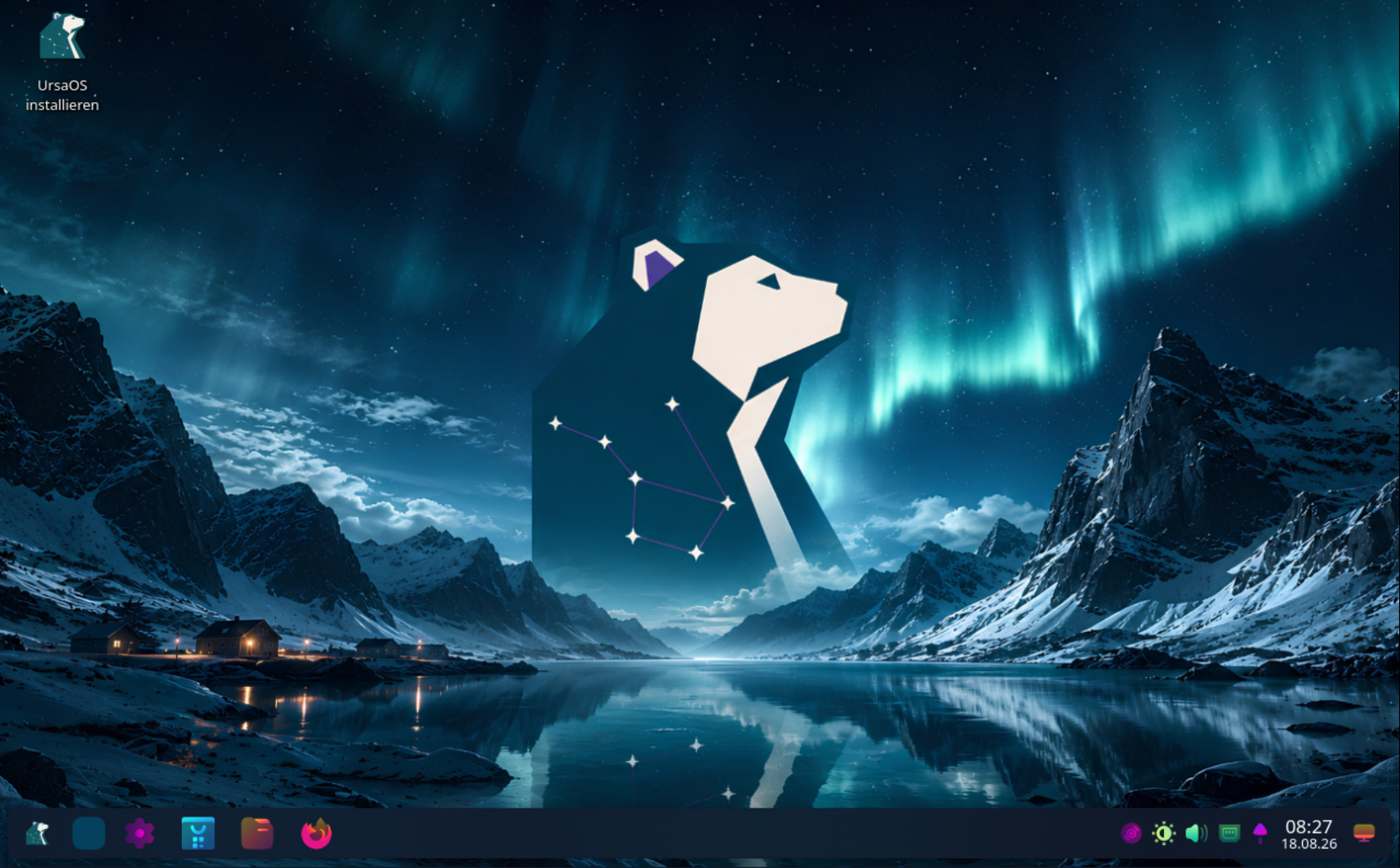
UrsaOS Plasma Desktop with UrsaOS Aurora look and SDDM login

Plasma Desktop — Pre-configured with UrsaOS Aurora, Kara pager and all curated apps.

Part of the Bear family

UrsaOS is part of the same product line as BearWave — lean Linux software without the noise.

Visit BearWave

Plasma Desktop

Fully pre-configured Plasma Wayland with UrsaOS Aurora look, BonaFides-Rounded-Dark window decoration and Sweet cursors.

UrsaOS Aurora

Own visual identity: UrsaOS Aurora look, UrsaOS SDDM greeter, Kara pager and consistent branding across the entire system.

Offline Calamares

What you see and test in the live ISO is copied 1:1 directly offline onto your drive.

Desktop Screenshots

Current Desktop — Plasma Desktop (v0.1.0-beta.3)

Click any image to open high-resolution view.

SDDM Greeter — Graphical login with UrsaOS Aurora design

UrsaOS SDDM Greeter with Aurora look

Live Desktop — Plasma Wayland with UrsaOS branding

UrsaOS Plasma live desktop

Terminal — Kitty with Fish, Starship & Fastfetch

Kitty Terminal with Fastfetch

System Info — UrsaOS Plasma Desktop overview

System info with UrsaOS branding

Free & Open Source Software

The UrsaOS source code is freely available and licensed under GPL-3.0-or-later. No telemetry, no tracking, no account. All code is on GitHub.

Technologies

Stack & Components

UrsaOS builds on proven open-source components and adds its own desktop stack.

Arch Linux
Plasma Desktop
SDDM
Wayland
Calamares
Btrfs

System

Hardware & Status

Actively developed and tested. Alpha — bugs are possible, feedback welcome.

UEFI (x86_64 GPT): supported
Legacy BIOS / CSM: unsupported (UEFI-only)
Calamares Installer: offline
ARM64: not planned

Install

Boot. Test. Install.

The ISO is not just an installer — it is a complete live system. If you like it, copy it to your drive.

01

Boot the ISO

UEFI (GRUB). Choose language in the boot menu: Deutsch or English.

02

Use the live desktop

Automatically logged in as user ursa. Network, browser, audio — everything works.

03

Install when ready

Open ursaos-install (Calamares) from the launcher. Offline copy of the live system, Btrfs partitioning, snapshot choice.

04

Reboot

SDDM login → Plasma desktop with UrsaOS Aurora look. cat /etc/os-release → ID=ursaos. Done.

Advanced Installation

Advanced path: ursaos-install-advanced launches archinstall online. Requires network, does not copy the live squashfs.

Download

Download ISO

Download ISO

ursaos-2026.08.18-x86_64.iso

2.9 GB · x86_64

Beta (v0.1.0-beta.3) — Ready for testing, hosted on SourceForge.

Verify checksum

sha256sum -c ursaos-2026.08.18-x86_64.iso.sha256
Version
v0.1.0-beta.3
Architecture
x86_64
Size
2.9 GB
SHA-256
aa146bb4325b4e12b46e61d16b0447a3c7970387870a094c0a3783c332341062
Public Beta Status (v0.1.0-beta.3)

v0.1.0-beta.3 is the current prerelease. UrsaOS is ready for broader testing, but it is not yet a stable production distribution. ISO images are hosted on SourceForge.

FAQ

Frequently Asked Questions

What is UrsaOS and how does it differ from Arch Linux?

UrsaOS is an Arch-based rolling release distribution with a pre-configured Plasma desktop and an offline Calamares installer. It uses Arch upstream repositories complemented by the signed ursaos package repository.

What are the system requirements for UrsaOS?

A 64-bit x86_64 processor with Wayland-compatible graphics (Intel, AMD, or NVIDIA with proprietary/nouveau drivers), at least 4 GB RAM, and 20 GB disk space (UEFI-only with GPT partitioning).

How does the Calamares installer work in UrsaOS?

The installer runs in offline mode and copies the exact state of the live ISO directly to your drive. The installed system is identical to your live test session — requiring no Arch mirror connection during setup.

How are system snapshots managed?

UrsaOS sets up Btrfs subvolumes (@, @home, @cache, @log) by default. Snapper or Timeshift can take automatic snapshots before package updates that can be restored via bootloader.

Why is the AUR (Arch User Repository) not active or pre-installed by default?

UrsaOS prioritizes system stability, security, and reproducible package states out-of-the-box. The AUR consists of user-submitted PKGBUILDs that should be inspected before build execution. To avoid unverified third-party packages in the base installation, UrsaOS strictly relies on pacman with official Arch Linux repositories and the signed ursaos package repository. Users can manually install AUR helpers such as paru or yay at any time.

Is UrsaOS ready for daily production use?

UrsaOS is currently in Beta status. It is ideal for enthusiasts and tinkerers wanting a pre-configured Plasma desktop on Arch. For critical production systems, regular backups are strongly recommended.

Updates

Changelog

v0.1.0-beta.3

2026-08-18

Changed

  • Updated ursaos-bearwave to upstream GitHub release v1.3.0 (was local
  • Made ursaos-bearwave (and ursaos-bearhub) hard dependencies of
  • scripts/publish-repo.sh now also publishes the Plasma stack packages
  • Updated ursaos-bearhub to upstream GitHub release 0.10.8-bearhub.1
  • Refreshed public and internal documentation for **Plasma as the standard
  • Successfully validated the complete Plasma E2E path on bare metal hardware:
  • Defined the permanent Beta-3 Plasma-only edition in archiso/plasma/.
  • Defined the permanent Beta-3 Plasma-only edition in archiso/plasma/.

Fixed

  • Keyboard layout: German (or other) selection no longer stuck on English.
  • Plasma live/first login could show wallpaper only (no panel). Autostart now
  • Fixed a blank post-install screen (blinking cursor) on Plasma: the UrsaOS
  • Redesigned the UrsaOS SDDM greeter: load the branded wallpaper via
  • Added the single fixed Plasma look UrsaOS Aurora: wallpaper-matched
  • Fixed Global Theme applying the stock KDE wallpaper: Plasma only accepts
  • Added ursaos-plasma-theme with the full fixed Aurora stack: Sweet-based
  • Preinstall the Kara workspace pager plasmoid (ursaos-kara, upstream
  • Persist the keyboard layout selected in Calamares into the installed system
  • Use the package-owned UrsaOS GRUB theme as the sole branded boot stage.
  • Fixed installation from USB media on systems where Archiso automatically
  • Removed the obsolete memdisk initramfs hook from the UEFI-only live profile;
  • Keyboard layout: German (or other) selection no longer stuck on English.
  • Plasma live/first login could show wallpaper only (no panel). Autostart now
  • Fixed a blank post-install screen (blinking cursor) on Plasma: the UrsaOS
  • Redesigned the UrsaOS SDDM greeter: load the branded wallpaper via
  • Added the single fixed Plasma look UrsaOS Aurora: wallpaper-matched
  • Fixed Global Theme applying the stock KDE wallpaper: Plasma only accepts
  • Added ursaos-plasma-theme with the full fixed Aurora stack: Sweet-based
  • Preinstall the Kara workspace pager plasmoid (ursaos-kara, upstream
  • Persist the keyboard layout selected in Calamares into the installed system
  • Use the package-owned UrsaOS GRUB theme as the sole branded boot stage.
  • Fixed installation from USB media on systems where Archiso automatically
  • Removed the obsolete memdisk initramfs hook from the UEFI-only live profile;

0.1.0-beta.1

2026-08-03

Added

  • Added the dedicated ursaos-keyring package and signed public package
  • Added ursaos-update, a manually started system updater plus a user timer
  • Added Fish as the default shell for new UrsaOS users with the official
  • Added Fastfetch with the real UrsaOS PNG through Kitty's direct graphics
  • Added source-built ursaos-paru as an explicit Calamares option while
  • Added Bat with an interactive Fish abbreviation that visibly expands cat
  • Replaced Alacritty with a branded Kitty configuration across Niri, DMS, the
  • Added a compact everyday desktop set: Nautilus with MTP support, File Roller,
  • Polished the Nautilus file-manager integration: system MIME defaults, Super+E
  • Hid libadwaita/GTK CSD min/max/close under Niri via gschema,
  • Added BlueZ and its command-line utilities and enabled the Bluetooth service
  • Added Pavucontrol and Blueman as the advanced audio and Bluetooth tools, with
  • Added BearHub as the source-built ursaos-bearhub package and a recommended
  • Added the optional ursaos-bearwave edition for Niri+DMS with native MPRIS
  • Added Linux LTS as a recommended additional-kernel installer choice.
  • Added DMS optional features to the default desktop: Qt image-format plugins,
  • Added pinned, MIT-license-preserving ursaos-dsearch and
  • Added DankGreeter from the pinned DMS source as the installed graphical
  • Added three 1920×1080 UrsaOS wallpaper variants and selected the first
  • Added the pinned GPLv3 ursaos-icons-beautysolar package as an optional
  • Extended DMS System → Users with an inline editor for existing accounts:

Changed

  • Integrated NetworkManager's advanced connection editor into every DMS
  • Changed current development images to UEFI-only. Removed the
  • Installed systems now persist the official [ursaos] Pacman repository;
  • Enabled Arch Linux's [multilib] repository in both the ISO build profile
  • Replaced the generic DMS package with ursaos-dms-shell, built from the same
  • Changed both the UEFI live menu and Calamares-installed GRUB configuration
  • Set Papirus-Dark from the official Arch repository as the default GTK/Qt
  • Changed automatic Btrfs mounts to
  • Removed Yay and made AUR access opt-in. Paru, its required base-devel

Fixed

  • Rebuilt ursaos-installer as 0.1.0-24 against Python 3.14 after the ISO
  • Ensured the DMS About page can always display the UrsaOS logo by requiring
  • Prevented the currently logged-in DMS account from being deleted and avoided
  • Restricted DankGreeter and its text fallback to the supported UrsaOS Niri
  • Calamares now removes the live-only Broadcom module override before building
  • Desktop users in the video group can now control kernel-exposed keyboard
  • Rebuilt ursaos-installer as 0.1.0-13 against the current Arch Python ABI
  • ISO builds now create or replace the matching .sha256 file, preventing an
  • Calamares removes copied Archiso systemd-networkd activation links and keeps
  • The current UEFI-only beta candidate completed the full core path: live boot,

0.1.0-alpha.2

2026-07-29

Fixed

  • ISO builds now rebuild stale UrsaOS packages and reject a Calamares binary
  • Calamares now replaces the temporary live Pacman keyring with a persistent
  • The release ISO boots through both UEFI GRUB and BIOS Syslinux.
  • The BIOS/MBR installation path completed installation, reboot, login and the

0.1.0-alpha.1

2026-07-28

Added

  • Graphical Niri + Dank Material Shell Try & Install live environment.
  • Branded German/English GRUB and Syslinux boot paths with safe-console
  • Calamares live-squashfs installer as the primary installation path.
  • Btrfs automatic layout with Snapper, Timeshift or no snapshot manager.
  • UrsaOS installer, desktop and base packages in a custom-only local repo.

Changed

  • Original UrsaOS project material is licensed under GPL-3.0-or-later.
  • Archinstall is now an advanced online fallback instead of the normal user
  • Package repository refresh and ISO staging are version-aware.
  • DMS and installer branding use the UrsaOS identity and artwork.

Fixed

  • Calamares startup under Niri/Wayland and missing KDE runtime libraries.
  • Target initramfs generation and required chroot virtual filesystems.
  • Snapper configuration without a running target D-Bus.
  • GRUB Btrfs boot failure caused by a sparse trailing kernel block.
  • A newly built ISO with ursaos-installer 0.1.0-10 completed a clean UEFI
  • BIOS end-to-end installation remains pending.

Contact & Legal Notice

Provider Information (Section 5 DDG)

Sebastian Palencsar

c/o Block Services

Stuttgarter Str. 106

70736 Fellbach

Germany

Contact

Email: dev@ursaos.dev

Social Media

Email Security

For email communication, I use Fastmail, hosted on EU servers in Amsterdam. The service provides high standards of data security and privacy with end-to-end transport encryption:

TLS transport encryption SPF sender protection DKIM signature DMARC policy

End-to-End Encryption (OpenPGP)

For confidential communication, you can encrypt emails using my public OpenPGP key.

Fingerprint D66C 39BA CDCD 18F0 CB6D 88AA BFC8 CE9E 4924 F6BC

Trust & Transparency

This information is provided to meet legal provider identification requirements. For legal matters, please contact directly.

Legal Notices & Privacy

Copyright & Design

© 2026 Sebastian Palencsár. All rights reserved. This website is a project landing page for the UrsaOS Linux distribution.

All content, works, website design, and graphical elements created by me are protected by German copyright law. Reproduction or use of these elements without explicit permission of the author is not permitted.

Data Protection

This website is a pure online portfolio. There is no permanent storage of IP addresses for analysis or tracking purposes. No tracking tools are used.

No external CDN services are embedded and no profiling is performed.

A temporary PHP session may be used for the contact form. PHPSESSID This is used exclusively to protect against abuse and is not stored permanently. The webserver processes connection data solely for technical delivery. access_log off Error logs are only created for critical system errors, without permanently storing IP addresses.

Protecting your personal data is a top priority.

Disclaimer

The content of these pages has been created with great care. However, no guarantee can be given for correctness, completeness, and timeliness.

Operators of external websites are solely responsible for their content.

Used Frameworks & Tools

This website uses the following frameworks and libraries among others:

TailwindCSS FontAwesome JavaScript Webfonts

These tools are used according to their respective license terms.

External Links

This website contains links to external third-party websites. These links are marked as such.

I have no influence on the content of these linked websites. The respective provider or operator of the linked pages is always responsible for their content.