
UrsaOS Logo UrsaOS
Public Beta · v0.1.0-beta.3

Arch Linux. Plasma Desktop. Live-ISO — teste, was du installierst.

Rolling Release auf Arch-Basis. Bootest du die ISO, landest du direkt im fertigen Desktop. Calamares kopiert genau diesen Stand offline auf dein System — kein Arch-Mirror nötig.
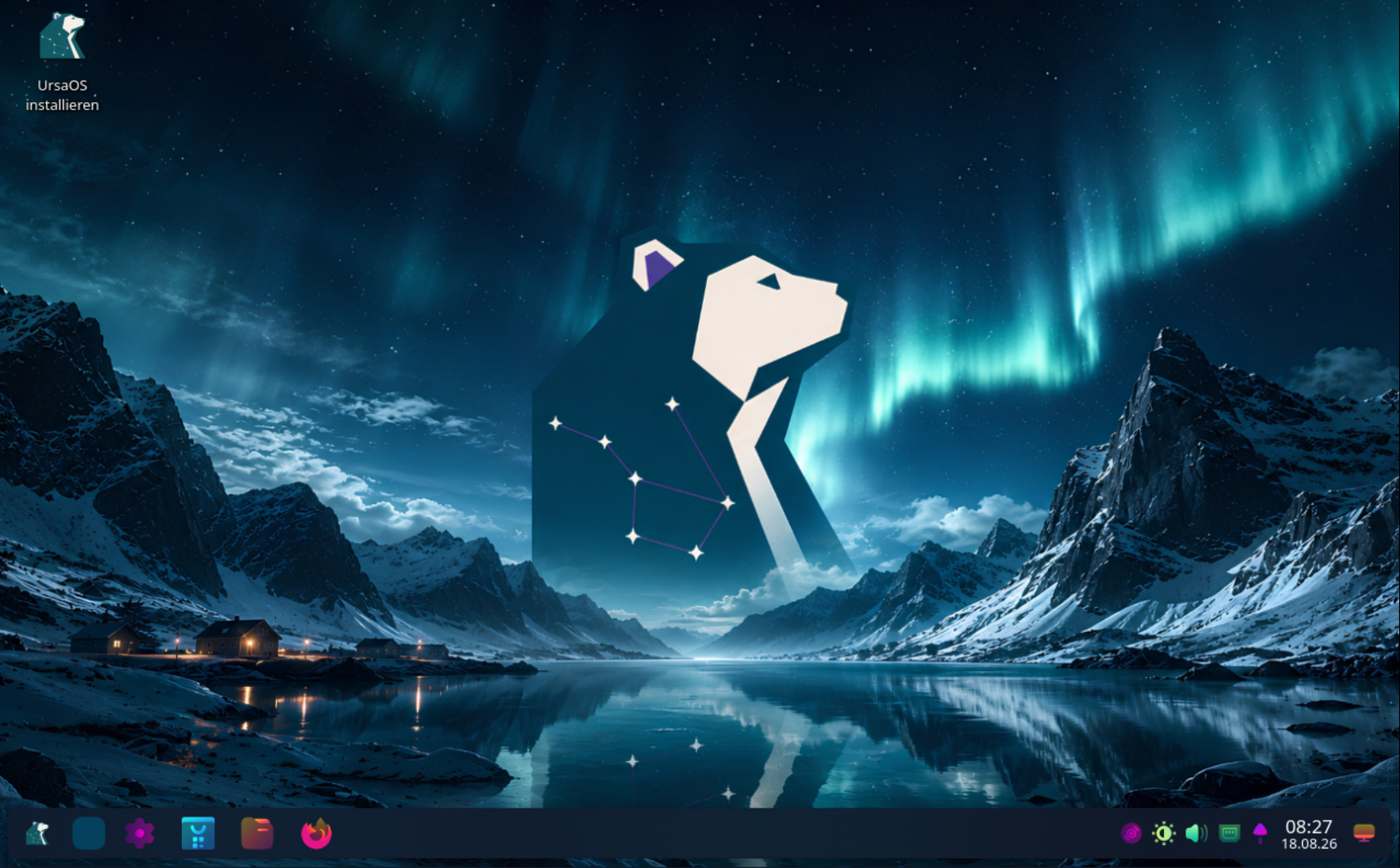
UrsaOS Plasma Desktop mit UrsaOS Aurora Look und SDDM Login

Plasma Desktop — Vorkonfiguriert mit UrsaOS Aurora, Kara Pager und allen curated Apps.

Teil der Bear-Familie

UrsaOS gehört zur gleichen Produktlinie wie BearWave — schlanke Linux-Software ohne Schnickschnack.

Zu BearWave

Plasma Desktop

Vollständig vorkonfiguriertes Plasma Wayland mit UrsaOS Aurora Look, BonaFides-Rounded-Dark Fensterdecoration und Sweet Cursors.

UrsaOS Aurora

Eigener visueller Auftritt: UrsaOS Aurora Look, UrsaOS SDDM Greeter, Kara Pager und konsistente Branding über das gesamte System.

Offline Calamares

Was du in der Live-ISO siehst und testest, wird 1:1 direkt offline auf deine Festplatte kopiert.

Desktop Screenshots

Aktuelle Oberfläche — Plasma Desktop (v0.1.0-beta.3)

Klicke auf ein Bild, um die hochauflösende Ansicht zu öffnen.

SDDM Greeter — Grafischer Login mit UrsaOS Aurora Design

UrsaOS SDDM Greeter mit Aurora Look

Live-Desktop — Plasma Wayland mit UrsaOS Branding

UrsaOS Plasma Live-Desktop

Terminal — Kitty mit Fish, Starship & Fastfetch

Kitty Terminal mit Fastfetch

System-Info — UrsaOS Plasma Desktop Übersicht

System-Info mit UrsaOS Branding

Freie & Quelloffene Software

Der UrsaOS-Quellcode ist frei verfügbar und unter GPL-3.0-or-later lizenziert. Keine Telemetrie, kein Tracking, kein Konto. Der gesamte Code liegt auf GitHub.

Technologien

Stack & Komponenten

UrsaOS baut auf geprüften Open-Source-Komponenten auf und fügt einen eigenen Desktop-Stack hinzu.

Arch Linux
Plasma Desktop
SDDM
Wayland
Calamares
Btrfs

System

Hardware & Status

Aktiv entwickelt und getestet. Alpha — Fehler sind möglich, Feedback willkommen.

UEFI (x86_64 GPT): unterstützt
Legacy BIOS / CSM: nicht unterstützt (UEFI-only)
Calamares Installer: offline
ARM64: nicht geplant

Install

Boot. Test. Install.

Die ISO ist nicht nur ein Installer — sie ist ein vollständiges Live-System. Wenn es dir gefällt, kopierst du es auf dein Laufwerk.

01

ISO booten

UEFI (GRUB). Sprache im Bootmenü wählen: Deutsch oder English.

02

Live-Desktop nutzen

Automatisch als Nutzer ursa. Netzwerk, Browser, Audio — alles läuft.

03

Installieren wenn bereit

ursaos-install (Calamares) im Launcher öffnen. Offline-Kopie des Live-Systems, Btrfs-Partitionierung, Snapshot-Wahl.

04

Neustart

SDDM Login → Plasma Desktop mit UrsaOS Aurora Look. cat /etc/os-release → ID=ursaos. Fertig.

Erweiterte Installation

Experten-Weg: ursaos-install-advanced startet archinstall online. Braucht Netzwerk, kopiert nicht die Live-Squashfs.

Download

ISO herunterladen

ISO herunterladen

ursaos-2026.08.18-x86_64.iso

2.9 GB · x86_64

Beta (v0.1.0-beta.3) — Bereit für Tests, gehostet auf SourceForge.

Checksumme prüfen

sha256sum -c ursaos-2026.08.18-x86_64.iso.sha256
Version
v0.1.0-beta.3
Architektur
x86_64
Größe
2.9 GB
SHA-256
aa146bb4325b4e12b46e61d16b0447a3c7970387870a094c0a3783c332341062
Public Beta Status (v0.1.0-beta.3)

v0.1.0-beta.3 ist der aktuelle Prerelease-Stand. UrsaOS ist bereit für breiteres Testen, aber noch keine stabile Produktionsdistribution. Die ISO-Dateien werden auf SourceForge gehostet.

FAQ

Häufig gestellte Fragen

Was ist UrsaOS und wie unterscheidet es sich von Arch Linux?

UrsaOS ist eine Arch-basierte Rolling-Release-Distribution mit vorkonfiguriertem Plasma Desktop und einem offline Calamares Installer. Es nutzt Arch-Upstream-Repositories, ergänzt um das ursaos Paket-Repository.

Welche Systemanforderungen hat UrsaOS?

Ein 64-Bit x86_64-Prozessor mit Wayland-fähiger Grafikkarte (Intel, AMD oder NVIDIA mit Proprietary/Nouveau Treibern), mindestens 4 GB RAM und 20 GB Festplattenspeicher (UEFI-only mit GPT-Partitionierung).

Wie funktioniert der Calamares Installer in UrsaOS?

Der Installer läuft im Offline-Modus und kopiert den genauen Zustand der laufenden Live-ISO direkt auf deine Festplatte. So ist das installierte System identisch mit der getesteten Live-Session — ohne Arch-Mirror beim Installieren zu benötigen.

Wie werden System-Snapshots verwaltet?

UrsaOS richtet standardmäßig Btrfs-Subvolumes (@, @home, @cache, @log) ein. Mit Snapper oder Timeshift können automatische System-Snapshots vor Paketupdates erstellt und im Bootloader wiederhergestellt werden.

Warum ist das AUR (Arch User Repository) ab Werk nicht aktiv oder vorinstalliert?

UrsaOS setzt ab Werk auf Systemstabilität, Sicherheit und reproduzierbare Paketstände. Das AUR enthält benutzererstellte PKGBUILDs, die vor der Installation manuell geprüft werden sollten. Um ungeprüfte Fremdpakete im Grundsystem zu vermeiden, nutzt UrsaOS standardmäßig ausschließlich pacman mit den offiziellen Arch Linux Repositories sowie dem eigenen signierten ursaos Paket-Repository. AUR-Helper wie paru oder yay können bei Bedarf jederzeit manuell installiert werden.

Ist UrsaOS für den täglichen Einsatz (Production) geeignet?

UrsaOS befindet sich aktuell im Beta-Stadium. Es eignet sich hervorragend für Enthusiasten und Bastler, die einen vorkonfigurierten Plasma Desktop auf Arch-Basis testen möchten. Für kritische Produktivsysteme empfehlen wir regelmäßige Backups.

Updates

Changelog

v0.1.0-beta.3

2026-08-18

Changed

  • Updated ursaos-bearwave to upstream GitHub release v1.3.0 (was local
  • Made ursaos-bearwave (and ursaos-bearhub) hard dependencies of
  • scripts/publish-repo.sh now also publishes the Plasma stack packages
  • Updated ursaos-bearhub to upstream GitHub release 0.10.8-bearhub.1
  • Refreshed public and internal documentation for **Plasma as the standard
  • Successfully validated the complete Plasma E2E path on bare metal hardware:
  • Defined the permanent Beta-3 Plasma-only edition in archiso/plasma/.
  • Defined the permanent Beta-3 Plasma-only edition in archiso/plasma/.

Fixed

  • Keyboard layout: German (or other) selection no longer stuck on English.
  • Plasma live/first login could show wallpaper only (no panel). Autostart now
  • Fixed a blank post-install screen (blinking cursor) on Plasma: the UrsaOS
  • Redesigned the UrsaOS SDDM greeter: load the branded wallpaper via
  • Added the single fixed Plasma look UrsaOS Aurora: wallpaper-matched
  • Fixed Global Theme applying the stock KDE wallpaper: Plasma only accepts
  • Added ursaos-plasma-theme with the full fixed Aurora stack: Sweet-based
  • Preinstall the Kara workspace pager plasmoid (ursaos-kara, upstream
  • Persist the keyboard layout selected in Calamares into the installed system
  • Use the package-owned UrsaOS GRUB theme as the sole branded boot stage.
  • Fixed installation from USB media on systems where Archiso automatically
  • Removed the obsolete memdisk initramfs hook from the UEFI-only live profile;
  • Keyboard layout: German (or other) selection no longer stuck on English.
  • Plasma live/first login could show wallpaper only (no panel). Autostart now
  • Fixed a blank post-install screen (blinking cursor) on Plasma: the UrsaOS
  • Redesigned the UrsaOS SDDM greeter: load the branded wallpaper via
  • Added the single fixed Plasma look UrsaOS Aurora: wallpaper-matched
  • Fixed Global Theme applying the stock KDE wallpaper: Plasma only accepts
  • Added ursaos-plasma-theme with the full fixed Aurora stack: Sweet-based
  • Preinstall the Kara workspace pager plasmoid (ursaos-kara, upstream
  • Persist the keyboard layout selected in Calamares into the installed system
  • Use the package-owned UrsaOS GRUB theme as the sole branded boot stage.
  • Fixed installation from USB media on systems where Archiso automatically
  • Removed the obsolete memdisk initramfs hook from the UEFI-only live profile;

0.1.0-beta.1

2026-08-03

Added

  • Added the dedicated ursaos-keyring package and signed public package
  • Added ursaos-update, a manually started system updater plus a user timer
  • Added Fish as the default shell for new UrsaOS users with the official
  • Added Fastfetch with the real UrsaOS PNG through Kitty's direct graphics
  • Added source-built ursaos-paru as an explicit Calamares option while
  • Added Bat with an interactive Fish abbreviation that visibly expands cat
  • Replaced Alacritty with a branded Kitty configuration across Niri, DMS, the
  • Added a compact everyday desktop set: Nautilus with MTP support, File Roller,
  • Polished the Nautilus file-manager integration: system MIME defaults, Super+E
  • Hid libadwaita/GTK CSD min/max/close under Niri via gschema,
  • Added BlueZ and its command-line utilities and enabled the Bluetooth service
  • Added Pavucontrol and Blueman as the advanced audio and Bluetooth tools, with
  • Added BearHub as the source-built ursaos-bearhub package and a recommended
  • Added the optional ursaos-bearwave edition for Niri+DMS with native MPRIS
  • Added Linux LTS as a recommended additional-kernel installer choice.
  • Added DMS optional features to the default desktop: Qt image-format plugins,
  • Added pinned, MIT-license-preserving ursaos-dsearch and
  • Added DankGreeter from the pinned DMS source as the installed graphical
  • Added three 1920×1080 UrsaOS wallpaper variants and selected the first
  • Added the pinned GPLv3 ursaos-icons-beautysolar package as an optional
  • Extended DMS System → Users with an inline editor for existing accounts:

Changed

  • Integrated NetworkManager's advanced connection editor into every DMS
  • Changed current development images to UEFI-only. Removed the
  • Installed systems now persist the official [ursaos] Pacman repository;
  • Enabled Arch Linux's [multilib] repository in both the ISO build profile
  • Replaced the generic DMS package with ursaos-dms-shell, built from the same
  • Changed both the UEFI live menu and Calamares-installed GRUB configuration
  • Set Papirus-Dark from the official Arch repository as the default GTK/Qt
  • Changed automatic Btrfs mounts to
  • Removed Yay and made AUR access opt-in. Paru, its required base-devel

Fixed

  • Rebuilt ursaos-installer as 0.1.0-24 against Python 3.14 after the ISO
  • Ensured the DMS About page can always display the UrsaOS logo by requiring
  • Prevented the currently logged-in DMS account from being deleted and avoided
  • Restricted DankGreeter and its text fallback to the supported UrsaOS Niri
  • Calamares now removes the live-only Broadcom module override before building
  • Desktop users in the video group can now control kernel-exposed keyboard
  • Rebuilt ursaos-installer as 0.1.0-13 against the current Arch Python ABI
  • ISO builds now create or replace the matching .sha256 file, preventing an
  • Calamares removes copied Archiso systemd-networkd activation links and keeps
  • The current UEFI-only beta candidate completed the full core path: live boot,

0.1.0-alpha.2

2026-07-29

Fixed

  • ISO builds now rebuild stale UrsaOS packages and reject a Calamares binary
  • Calamares now replaces the temporary live Pacman keyring with a persistent
  • The release ISO boots through both UEFI GRUB and BIOS Syslinux.
  • The BIOS/MBR installation path completed installation, reboot, login and the

0.1.0-alpha.1

2026-07-28

Added

  • Graphical Niri + Dank Material Shell Try & Install live environment.
  • Branded German/English GRUB and Syslinux boot paths with safe-console
  • Calamares live-squashfs installer as the primary installation path.
  • Btrfs automatic layout with Snapper, Timeshift or no snapshot manager.
  • UrsaOS installer, desktop and base packages in a custom-only local repo.

Changed

  • Original UrsaOS project material is licensed under GPL-3.0-or-later.
  • Archinstall is now an advanced online fallback instead of the normal user
  • Package repository refresh and ISO staging are version-aware.
  • DMS and installer branding use the UrsaOS identity and artwork.

Fixed

  • Calamares startup under Niri/Wayland and missing KDE runtime libraries.
  • Target initramfs generation and required chroot virtual filesystems.
  • Snapper configuration without a running target D-Bus.
  • GRUB Btrfs boot failure caused by a sparse trailing kernel block.
  • A newly built ISO with ursaos-installer 0.1.0-10 completed a clean UEFI
  • BIOS end-to-end installation remains pending.

Kontakt & Impressum

Angaben gemäß Paragraph 5 DDG

Sebastian Palencsar

c/o Block Services

Stuttgarter Str. 106

70736 Fellbach

Deutschland

Kontakt

E-Mail: dev@ursaos.dev

Social Media

E-Mail-Sicherheit

Für die E-Mail-Kommunikation nutze ich Fastmail, gehostet auf EU-Servern in Amsterdam. Der Dienst bietet hohe Standards in Datensicherheit und Datenschutz mit durchgehender Transportverschlüsselung:

TLS Transportverschlüsselung SPF Absenderschutz DKIM Signatur DMARC Richtlinie

Ende-zu-Ende-Verschlüsselung (OpenPGP)

Für eine vertrauliche Kommunikation können Sie E-Mails mit meinem öffentlichen OpenPGP-Schlüssel verschlüsseln.

Fingerprint D66C 39BA CDCD 18F0 CB6D 88AA BFC8 CE9E 4924 F6BC

Vertrauen & Transparenz

Diese Angaben dienen der gesetzlich geforderten Anbieterkennzeichnung. Bei rechtlichen Fragen bitte direkten Kontakt aufnehmen.

Rechtliche Hinweise & Datenschutz

Copyright & Design

© 2026 Sebastian Palencsár. Alle Rechte vorbehalten. Diese Website dient als Projekt-Landingpage für die Linux-Distribution UrsaOS.

Die durch mich erstellten Inhalte, Werke, das Design dieser Website sowie alle verwendeten grafischen Elemente unterliegen dem deutschen Urheberrecht. Eine Vervielfältigung oder Verwendung dieser Elemente ohne ausdrückliche Zustimmung des Urhebers ist nicht gestattet.

Datenschutz

Diese Website ist ein reines Online-Portfolio. Es erfolgt keine dauerhafte Speicherung von IP-Adressen zu Analyse- oder Trackingzwecken. Es werden keine Tracking-Tools eingesetzt.

Es werden keine externen CDN-Dienste eingebunden und keine Profilbildung durchgeführt.

Für das Kontaktformular wird gegebenenfalls eine temporäre PHP-Session verwendet. PHPSESSID Diese dient ausschließlich dem Schutz vor Missbrauch und wird nicht dauerhaft gespeichert. Der Webserver verarbeitet Verbindungsdaten ausschließlich zur technischen Auslieferung. access_log off Error-Logs werden nur bei kritischen Systemfehlern erstellt, ohne IP-Adressen dauerhaft zu speichern.

Der Schutz deiner persönlichen Daten hat höchste Priorität.

Haftungsausschluss

Die Inhalte dieser Seiten wurden mit größter Sorgfalt erstellt. Für die Richtigkeit, Vollständigkeit und Aktualität kann jedoch keine Gewähr übernommen werden.

Für Inhalte externer Links sind ausschließlich deren Betreiber verantwortlich.

Verwendete Frameworks & Tools

Diese Website verwendet unter anderem folgende Frameworks und Bibliotheken:

TailwindCSS FontAwesome JavaScript Webfonts

Diese Tools werden gemäß ihrer jeweiligen Lizenzbedingungen verwendet.

Externe Links

Diese Website enthält Links zu externen Websites Dritter. Diese Links sind als solche kenntlich gemacht.

Auf die Inhalte der verlinkten Seiten besteht kein Einfluss. Für die Inhalte der verlinkten Seiten ist stets der jeweilige Anbieter oder Betreiber verantwortlich.